Information kiosks are self-service terminals that provide directions, directories, and service access without requiring staff assistance. They are used to reduce friction, improve navigation, and deliver consistent information across high-traffic environments.

What’s changed in recent years is not just where kiosks are used, but how they’re expected to perform. In many environments, they are no longer treated as simple digital directories. They are expected to support real workflows—guiding visitors, reducing staff workload, and integrating with the systems that run day-to-day operations.
You’ll see that shift in places like hospitals, corporate campuses, transportation hubs, and retail environments, where kiosks are used to manage flow, improve access to information, and create a more consistent experience across locations.
That said, an information kiosk is not just a screen in a lobby. The difference between a kiosk that improves operations and one that gets ignored usually comes down to how well it fits into the environment it serves. The best systems are designed as part of a broader digital kiosk strategy, where hardware, software, and user experience are aligned with real workflows—not layered on afterward.
For organizations evaluating information kiosks, the real question is not whether kiosks are useful. It is whether the system being deployed will actually support how people move through your space and how your team delivers service.
What Is a Digital Information Kiosk?
A digital information kiosk is a self-service terminal that gives users access to directions, directories, announcements, or service-related information without requiring direct staff assistance. In some environments, that may be as simple as helping a visitor find a suite or department. In others, the kiosk may support check-in, registration, or additional self-service functions.
In practice, information kiosks often overlap with broader categories like interactive kiosks and self-service kiosks. The distinction usually comes down to how far the interaction goes. Some kiosks inform. Others inform and transact. Many do both.
That distinction matters during planning. A system designed only to display information has very different requirements than one expected to integrate with scheduling platforms, visitor management systems, or payment workflows. Understanding that early helps prevent underbuilt systems or unnecessary complexity.
Why Organizations Are Investing in Information Kiosks
Most organizations do not start looking at information kiosks because they want new technology. They start because they are dealing with friction—too many repetitive questions, too much dependence on front desk staff, or too much variability in how information is delivered across locations.
Information kiosks help reduce that friction by moving routine interactions into a controlled, repeatable system. Directions, frequently asked questions, basic check-ins, and general navigation no longer require staff involvement every time.
For procurement and operations teams, that translates into a few practical outcomes. Staffing pressure becomes easier to manage. Service delivery becomes more consistent. And the experience for visitors or customers becomes more predictable, especially in high-traffic environments.
That consistency is often what drives adoption across multiple locations. Once a kiosk system proves effective in one facility, it becomes a scalable model that can be deployed elsewhere without reinventing the experience each time.
How Digital Information Kiosks Improve User Experience
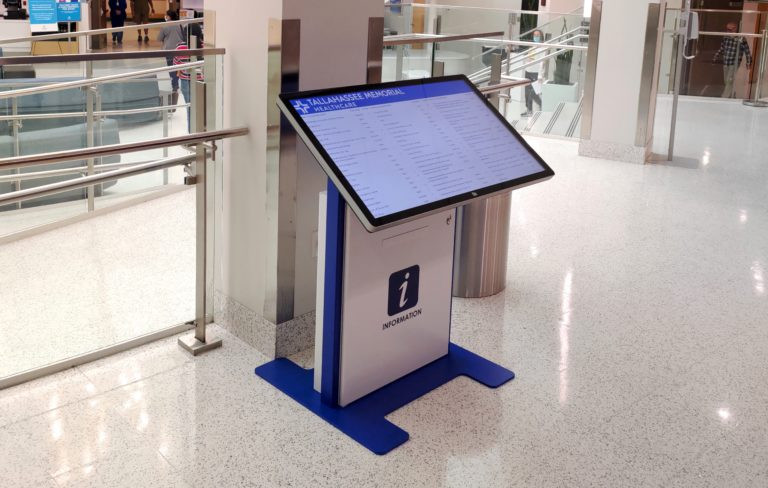
From the user’s perspective, the value of an information kiosk is straightforward. It removes uncertainty. Instead of looking for someone to ask—or waiting in line to do it—they can access what they need immediately.
This becomes especially important in large or unfamiliar environments. In healthcare settings, for example, navigation can be a source of real stress. Systems designed around hospital wayfinding and patient check-in kiosks are not just about efficiency. They help people move through the environment with more confidence and less frustration.
The same applies in office buildings, campuses, and public facilities. When the path to information is clear and immediate, the entire experience feels more organized. That perception carries over into how people evaluate the organization itself.
Operational Benefits of Information Kiosks
On the operational side, information kiosks reduce the burden of repetitive interactions. Staff are no longer answering the same directional questions or manually guiding visitors through basic processes throughout the day.
This does not eliminate the need for staff, but it changes how staff time is used. Instead of handling routine inquiries, teams can focus on more complex or higher-value interactions that require judgment or personal attention.
Kiosks also introduce consistency. Information is presented the same way every time, regardless of location or shift. For organizations managing multiple sites, that consistency is often just as important as efficiency.
Over time, usage data can also provide insight into how people are interacting with a space. Search behavior, peak usage times, and navigation patterns can all highlight where additional signage, staffing, or process improvements may be needed.
Common Information Kiosk Applications
Information kiosks are used across a wide range of industries, but the most successful deployments are tied to specific operational needs rather than general use.
In commercial real estate and mixed-use environments, kiosks are often deployed as digital building directories, helping visitors locate tenants, offices, and amenities. These systems frequently tie into broader digital directory platforms and support more advanced digital wayfinding strategies.
Healthcare environments rely on kiosks for navigation, registration, and patient communication. Educational campuses use them to support navigation and event information. Government facilities use them to improve access to services and reduce administrative bottlenecks, often as part of larger initiatives around digital signage and interactive wayfinding.
Corporate environments use kiosks to support visitor management systems, internal communications, and front-of-house operations. Retail environments extend their in-store experience with product information and self-service interactions. While the use cases vary, the underlying goal is consistent: make information easier to access while improving flow through the space.
Information Kiosks, Digital Directories, and Wayfinding
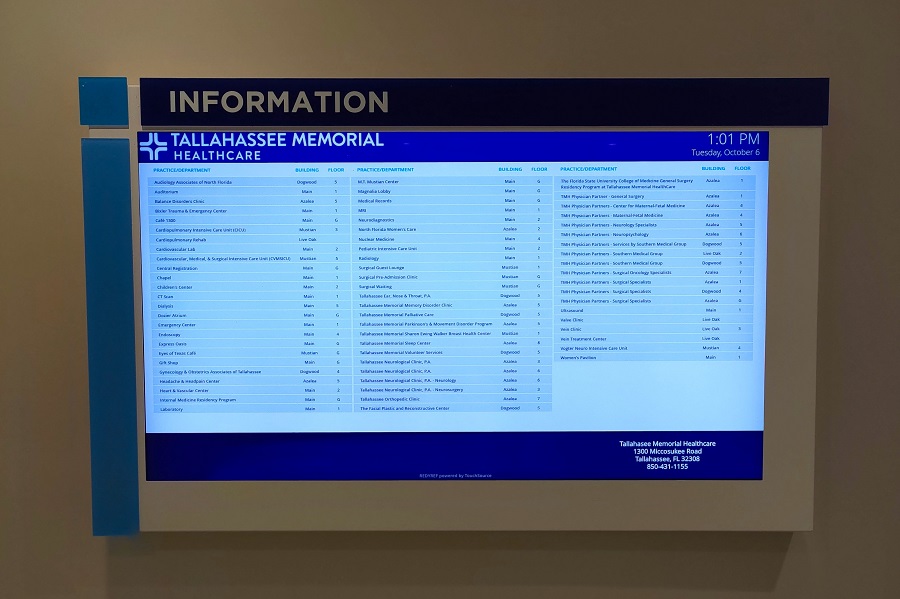
Information kiosks rarely exist in isolation. In many deployments, they function as part of a broader system that includes directories, mapping, and navigation tools.
A lobby kiosk may begin as a searchable directory and then guide the user through a route. In a hospital, the interaction may start with a department lookup and continue through wayfinding and check-in. In a campus environment, the same system may combine maps, schedules, and announcements.
This is why successful deployments are designed around the full user journey. The kiosk is not just answering a question. It is helping the user complete the next step in that interaction.
Indoor, Outdoor, and Environment-Specific Design Considerations
The physical environment plays a major role in how an information kiosk should be designed. Indoor and outdoor deployments have very different requirements, and treating them the same is a common source of failure.
Outdoor systems must account for temperature variation, weather exposure, screen visibility in direct sunlight, and long-term durability. These are not minor adjustments—they affect enclosure design, component selection, and overall system reliability. Solutions like outdoor information kiosks and approaches to outdoor digital kiosk design reflect those differences.
Even indoor systems require careful consideration. Placement, traffic flow, available space, power access, and visibility all influence whether a kiosk is used effectively or ignored. Freestanding units, wall-mounted systems, and custom enclosures each serve different purposes depending on the environment.
Accessibility and Usability Matter
An information kiosk only delivers value if people can actually use it. Accessibility and usability should be built into the design from the beginning, not addressed after deployment.
Screen height, reach range, viewing angle, interface clarity, and navigation structure all affect usability. ADA considerations are especially important in public-facing environments, and systems should be designed accordingly. REDYREF addresses these requirements as part of its broader approach to accessible kiosk design.
Just as important is interface design. A kiosk that looks good but feels confusing will not be used. The interaction has to be intuitive, fast, and aligned with how users actually think—not how information is organized internally.
What to Look for in an Information Kiosk Partner
Choosing an information kiosk provider is not just a matter of buying hardware. The real question is whether the partner understands how to turn a concept into a reliable, deployment-ready system that fits your operational needs.
That means looking beyond the enclosure and screen. Industrial design, engineering, manufacturing, software integration, deployment planning, and long-term support all play a role in whether a kiosk performs as expected once it is in the field.
It also means evaluating how the system is approached from the start. A kiosk designed around a clear kiosk strategy—one that accounts for user behavior, environment, and workflow—is far more likely to succeed than one selected based on hardware alone. The same applies when considering how a partner approaches manufacturer selection and what is involved in a true turnkey kiosk design process.
REDYREF’s approach centers on building systems that integrate with existing technology, support real-world workflows, and perform reliably in the environments where they are deployed. The objective is not simply to install a kiosk, but to deliver a system that actually works in practice.
Information Kiosks as Part of a Larger Service Strategy
Information kiosks are most effective when they are treated as part of a broader service strategy rather than a standalone technology purchase.
When properly designed and integrated, they improve navigation, reduce friction, support visitor management, and create a more consistent experience across locations. They can function as simple information hubs or as part of a larger ecosystem that includes directories, wayfinding, and self-service interactions.
For organizations evaluating information kiosks, the goal is not just to add a digital touchpoint. It is to create a system that aligns with how people move through your environment and how your team delivers service. That is where thoughtful design, integration, and manufacturing experience make the difference.